On this page
- What Is VLSM?
- What Is the MD Ar Parvez VLSM Calculator?
- Key Features of the VLSM Calculator
- 1. Automatic subnet calculation
- 2. Efficient IP address utilization
- 3. Largest-first allocation
- 4. Support for /31 and /32
- How to Use the VLSM Calculator
- Practical VLSM Calculation Example
- VLSM vs. FLSM: What's the Difference?
- Who Should Use This Calculator?
- Frequently Asked Questions
- Is the VLSM Calculator free to use?
- What is the main advantage of VLSM?
- Why should the largest subnet be allocated first?
- Can I use VLSM for CCNA practice?
- What happens if my parent network is too small?
- Conclusion

VLSM Calculator: Easily Plan and Optimize Your IPv4 Subnets
Network administrators, IT students, and network engineers often face a common challenge: dividing an IP address range into multiple subnets while minimizing address waste. Calculating subnet sizes manually can be time-consuming, especially when different departments or devices require different numbers of IP addresses.
The VLSM Calculator at mdarparvez.com/vlsm-calculator helps simplify this process. It allows you to enter a parent IPv4 network and specify the number of hosts needed for each subnet. The tool then calculates appropriately sized subnet blocks and arranges them from largest to smallest.
Whether you're studying for a CCNA certification, designing an office network, or managing an enterprise infrastructure, this tool can help make subnet planning easier and more efficient.
What Is VLSM?
VLSM stands for Variable Length Subnet Masking. It is a subnetting technique that allows a single IP network to be divided into subnets of different sizes.
Unlike Fixed Length Subnet Masking (FLSM), which assigns the same subnet size to every network, VLSM lets you allocate IP addresses according to actual host requirements.
For example, a company might need:
- 100 IP addresses for its main office.
- 50 IP addresses for an engineering department.
- 20 IP addresses for a management team.
- 2 IP addresses for a point-to-point router link.
Using VLSM, each network can receive an appropriately sized subnet rather than wasting addresses by assigning every department an equally large block.
What Is the MD Ar Parvez VLSM Calculator?
The mdarparvez VLSM Calculator is an online IPv4 subnet-planning tool designed to automate variable-length subnet calculations.

Flexible subnet allocation
Specify a parent network and the number of usable hosts required for each subnet.

Automatic subnet sizing
The calculator chooses the smallest suitable address block for each host requirement and allocates larger blocks first.

Special-purpose address support
The tool includes options for /31 point-to-point links and /32 single-address entries.
Key Features of the VLSM Calculator
Here are some of the main benefits of using this tool for network design.
1. Automatic subnet calculation
Manual subnetting involves calculating host bits, subnet masks, network addresses, and broadcast addresses. The calculator automates subnet sizing and allocation, reducing repetitive work.
2. Efficient IP address utilization
VLSM allows each subnet to use a block suited to its requirements. This helps conserve IPv4 address space and leaves more room for future expansion.
3. Largest-first allocation
The calculator allocates larger subnets before smaller ones. This approach helps maintain correct subnet boundaries and makes efficient use of the available address range.
4. Support for /31 and /32
The tool provides options for /31 prefixes used for point-to-point links under RFC 3021 and /32 prefixes used for individual addresses, such as loopbacks.
How to Use the VLSM Calculator
Follow these simple steps to create your subnet allocation plan.

Step 1: Enter the parent network
Open the VLSM Calculator and enter your IPv4 network in CIDR notation, such as 192.168.0.0/24.

Step 2: Add subnet requirements
Enter a name and the number of usable host addresses required for each subnet. You can also paste a list of subnet requirements or use the example options.

Step 3: Configure allocation options
If necessary, enable /31 for supported point-to-point links or /32 for single-address entries.

Step 4: Review the results
Check the assigned subnet blocks and confirm that the resulting network design meets your requirements.
Practical VLSM Calculation Example
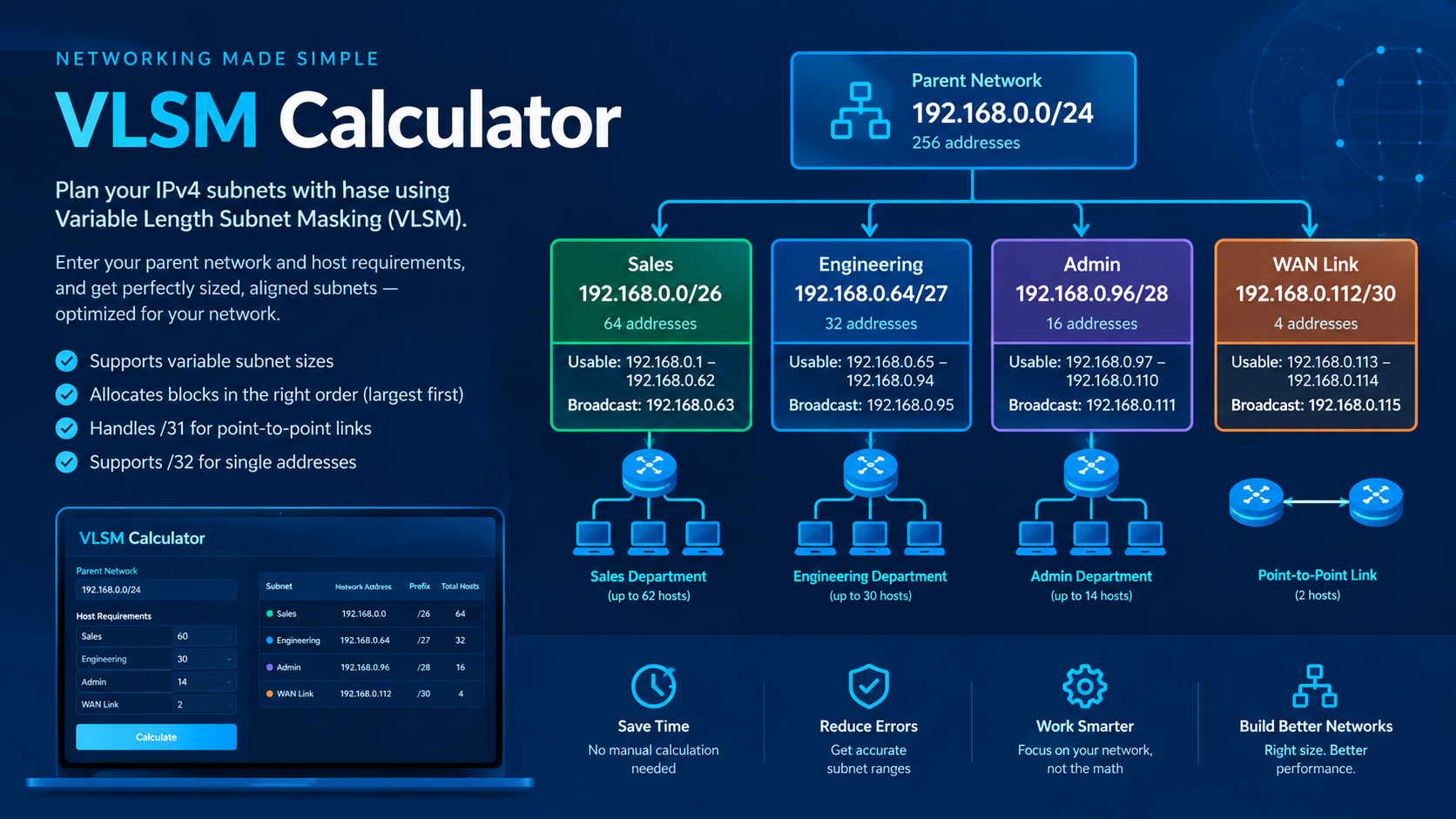
Suppose you have the network 192.168.0.0/24 and need to create four subnets for different departments.
| Department | Required hosts | Subnet | Total addresses |
|---|---|---|---|
| Sales | 60 | 192.168.0.0/26 | 64 |
| Engineering | 30 | 192.168.0.64/27 | 32 |
| Administration | 14 | 192.168.0.96/28 | 16 |
| WAN link | 2 | 192.168.0.112/30 | 4 |
These allocations use 116 of the 256 addresses in the parent network, leaving 140 addresses outside the four allocated blocks.
The calculation works because each subnet has enough usable addresses for its requirements, with the conventional network and broadcast addresses reserved.
For example, the Sales subnet uses 192.168.0.0/26:
- Network address:
192.168.0.0 - Subnet mask:
255.255.255.192 - First usable address:
192.168.0.1 - Last usable address:
192.168.0.62 - Broadcast address:
192.168.0.63 - Usable hosts: 62
This example demonstrates how VLSM can allocate different subnet sizes from one parent network.
VLSM vs. FLSM: What's the Difference?
| Feature | VLSM | FLSM |
|---|---|---|
| Subnet sizes | Different sizes | Equal sizes |
| Address utilization | Usually more efficient | Can waste addresses |
| Flexibility | High | Limited |
| Planning complexity | Requires individual sizing | Simpler to calculate |
| Best suited for | Networks with varied host requirements | Networks needing uniform subnets |
For networks with departments of different sizes, VLSM is often the more practical choice because it avoids allocating unnecessarily large blocks to smaller groups.
Who Should Use This Calculator?
The tool can be useful for:
- Networking students: Practice subnetting and verify CCNA or Network+ exercises.
- Network engineers: Prepare IP addressing plans for routers, switches, VLANs, and office networks.
- IT administrators: Allocate address space for departments, servers, and branch offices.
- Teachers and trainers: Demonstrate subnet allocation with real IPv4 examples.
- Network enthusiasts: Learn CIDR notation, subnet masks, and variable-length subnetting.
Frequently Asked Questions
Is the VLSM Calculator free to use?
You can visit the calculator directly at mdarparvez.com/vlsm-calculator. Check the website for its current usage terms.
What is the main advantage of VLSM?
Its main advantage is efficient IPv4 address allocation. Different subnets can receive different-sized address blocks according to their host requirements.
Why should the largest subnet be allocated first?
Larger subnets have stricter address-boundary requirements. Allocating them first helps prevent fragmentation and makes it easier to fit smaller subnets into the remaining address space.
Can I use VLSM for CCNA practice?
Yes. A VLSM calculator is useful for checking your calculations and understanding how network addresses, prefix lengths, and host ranges relate to one another. Practice calculating the results manually as well so you understand the underlying concepts.
What happens if my parent network is too small?
A subnet plan must fit within the available parent address range. If the required subnet blocks exceed that capacity, you need a larger parent network or fewer/smaller subnet requirements.
Conclusion
Variable Length Subnet Masking is an essential technique for designing efficient IPv4 networks. By allocating different subnet sizes according to host requirements, network administrators can reduce address waste and create more flexible addressing plans.
The MD Ar Parvez VLSM Calculator simplifies the process by automatically sizing and aligning subnet blocks, with options for point-to-point links and single-address entries.
If you want to save time on subnet planning, practice networking concepts, or organize an IPv4 network, try the tool here: